The scene
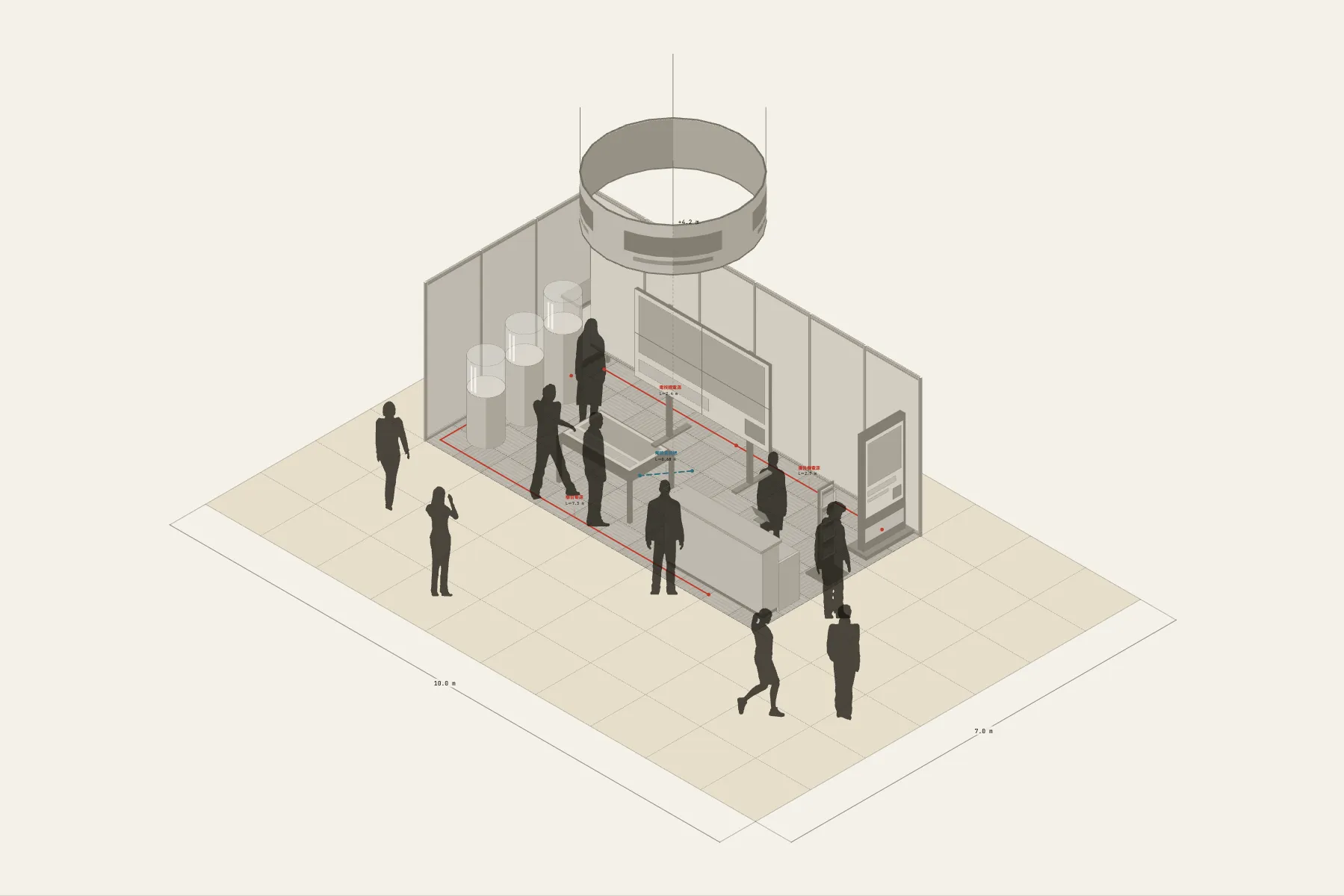
A 6 × 3 m corner booth in an exhibition hall, open to the aisle on two sides. People walking past see the video wall in the middle of the back wall first; the ones it stops take a step in and try the touch table for themselves. Anyone with a question turns round to the reception counter. The round sign hangs at 4.2 m, so the booth can be found from two aisles away.
When it helps
- Your booth space has just been confirmed and the organiser wants a layout before the deadline.
- You are asking stand builders and AV suppliers for quotes and need a drawing that shows sizes and quantities.
- You want the team to agree first on where the screens go, which way the counter faces and which side the power comes in.
What’s already laid out
- System walls: 6 m along the back and 3 m on one side, open at the front and on the right.
- A 2 × 2 video wall of four 55-inch screens in the middle of the back wall.
- One touch table, one digital sign and one reception counter.
- A 2.4 m round hanging sign, 4.2 m off the floor.
- Four cable runs — video wall power, touch table signal, counter power and digital sign power — each with its length.
- Plus 10 figures for scale and circulation. If you don’t need them, delete them all in one go.
Making it yours
- Press “Start from this one”. The template opens in the editor as your own drawing; whatever you change, the original template stays as it was.
- Change the booth size in the Space panel on the right. 3 × 3, 3 × 6 and 6 × 6 are each two numbers.
- For a one-sided or island booth, remove or add wall sections — the walls come in segments.
- The video wall’s screen size and grid can be changed directly; the counts in the list follow.
- For anything missing, press Components at the bottom: search by name and click to place it. Select what you don’t need and press Delete.
- When the layout is right, press Download at the top right to save it as an image, then drop it into a deck or send it as it is.
What to settle first
- Put up the walls first. Once the back and side walls are set, so are the open sides.
- Then place the display kit: video wall against the back wall, touch table further forward so the picture can be seen from the aisle.
- Put the reception counter by an open side, where it is the first thing a visitor reaches.
- Run the cables last. Whichever side the power comes in on, the cables follow the foot of that wall.
What you end up with
- A layout drawing
- Download it as a PNG or JPG, at a resolution that holds up in a deck or a proposal.
- An object list
- The name and quantity of everything on the drawing. Change the drawing and the list changes with it.
- A length for every cable
- Power and signal runs have a length as soon as they are drawn. Order from those numbers.
- A link to send
- Once you sign in, the drawing can become a link that opens in any browser.