The scene
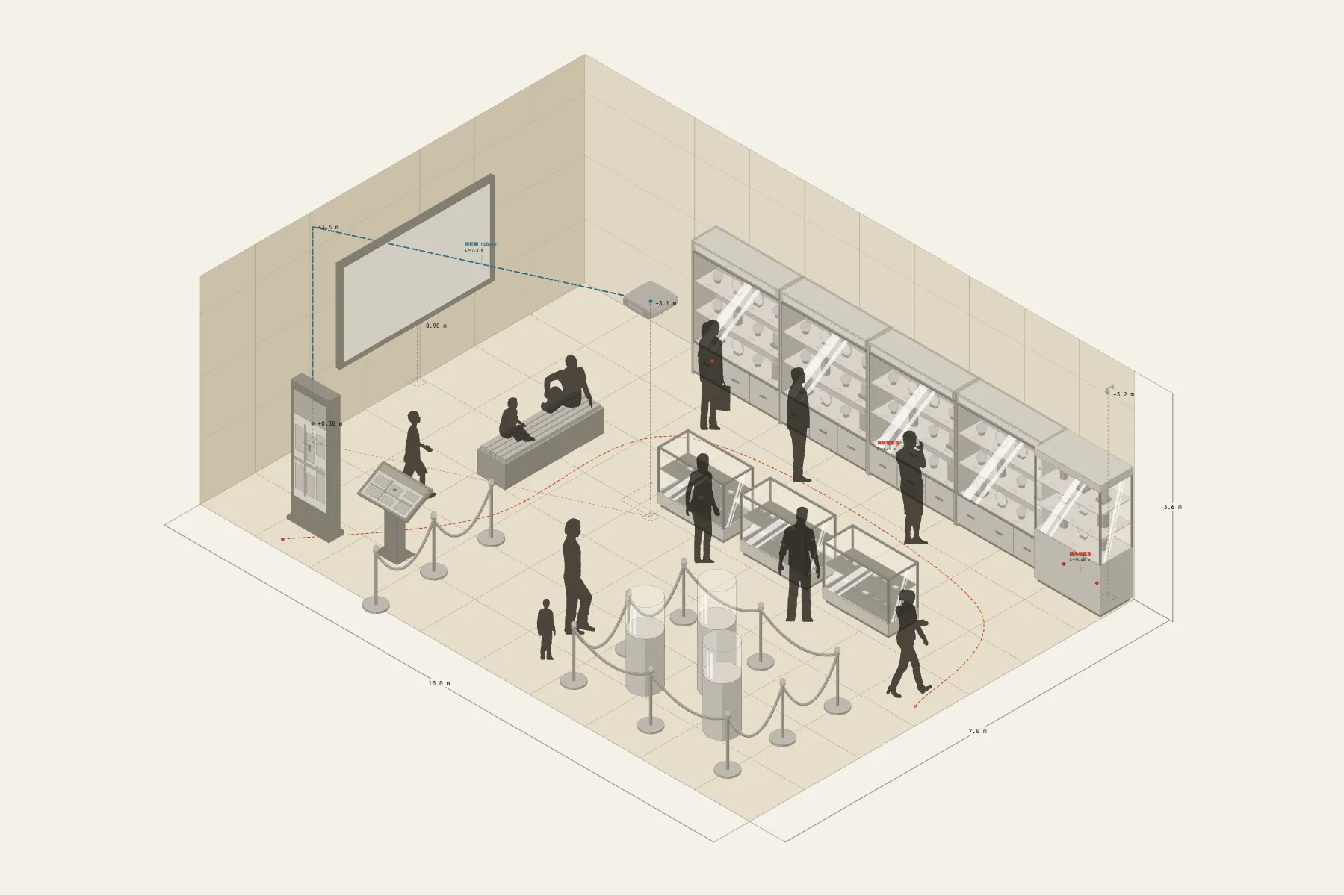
One room of a temporary exhibition. Visitors come in at one corner and work their way along the cases on the back wall, one at a time. The three plinths with glass covers in the middle hold the most important pieces, kept at a distance by rope barriers. There is a bench in front of the projection for anyone who wants to sit. After one loop they leave by the other corner.
When it helps
- Early in a show’s planning, when you need to talk through case numbers and the visitor route with the museum or the client.
- You are getting quotes for display construction and need a drawing that shows case sizes and positions.
- A projection or other AV has to go in the room and you want to check the throw distance and the cable route first.
What’s already laid out
- Wall cases and a corner case along the back wall, their lighting on one shared power run.
- Freestanding cases and plinths in the middle of the room; the key piece sits under a 0.5 m glass cover.
- Rope barriers around the key pieces, which also mark the route.
- A 120-inch projection with a 4.3 m throw; its signal cable climbs the wall to 3.4 m before crossing.
- One bench facing the projection.
- Plus 11 figures for scale and circulation. If you don’t need them, delete them all in one go.
Making it yours
- Press “Start from this one”. The template opens in the editor as your own drawing; whatever you change, the original template stays as it was.
- Change the room’s width, depth and wall height in the Space panel.
- The cases are adjustable — length, height, with or without a glass cover — and the list updates as you change them.
- To check the route is wide enough, draw a dimension line between two cases.
- For anything missing, press Components at the bottom: search by name and click to place it. Select what you don’t need and press Delete.
- When the layout is right, press Download at the top right to save it as an image, then drop it into a deck or send it as it is.
What to settle first
- Place the cases first: the wall cases, then the ones in the middle, leaving enough between them for two people to pass.
- Then mark the route with the barriers. Entrance at one corner, exit at the other, so visitors make one loop without doubling back.
- AV goes in last. The projector’s position follows from the picture size, and the drawing lets you measure the throw.
- Run cables along the walls, away from the floor in front of the cases.
What you end up with
- A layout drawing
- Download it as a PNG or JPG, at a resolution that holds up in a deck or a proposal.
- An object list
- The name and quantity of everything on the drawing. Change the drawing and the list changes with it.
- A length for every cable
- Power and signal runs have a length as soon as they are drawn. Order from those numbers.
- A link to send
- Once you sign in, the drawing can become a link that opens in any browser.