The scene
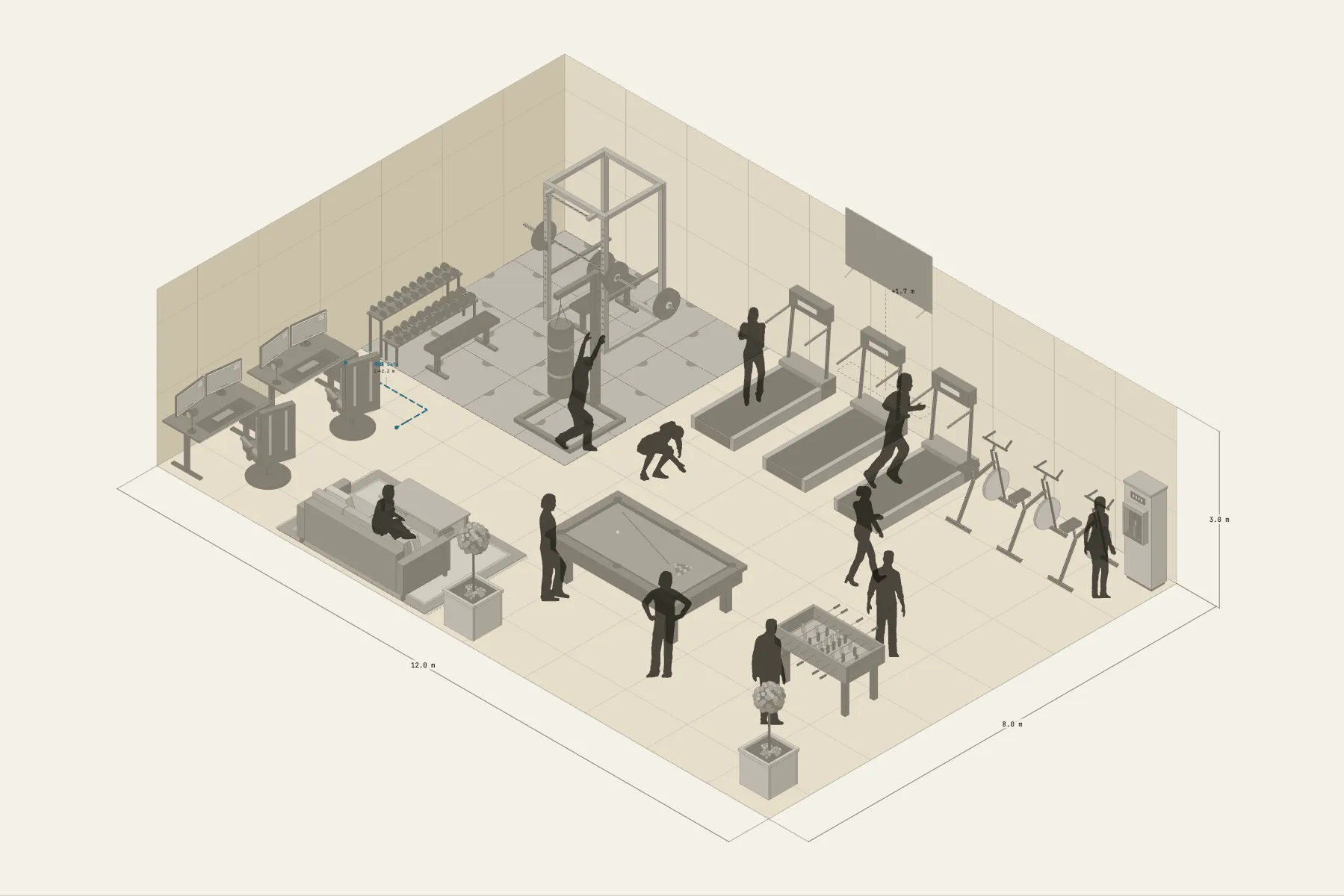
A 96 m² basement room at a company, turned into a staff lounge. Half is for exercise: cardio machines in a row facing the TV on the wall, and next to them the weights area on rubber flooring. The other half is for winding down: an 8 ft pool table, two gaming stations and a sofa.
When it helps
- Office or facilities staff are making the case and want managers to see the finished room.
- You are getting quotes for equipment and flooring and need quantities and sizes.
- You want to check the clearances between machines and around the pool table.
What’s already laid out
- A cardio area: machines in a row, facing the TV on the same wall.
- A weights area on 4 × 4 m of rubber flooring, with a squat rack and other strength equipment.
- An 8 ft pool table with at least 1.5 m clear along each long side for cueing, and a second games table beside it.
- Gaming stations and a sofa in the lounge area.
- One network run to the gaming stations.
- Plus 11 figures for scale and circulation. If you don’t need them, delete them all in one go.
Making it yours
- Press “Start from this one”. The template opens in the editor as your own drawing; whatever you change, the original template stays as it was.
- The flooring is painted in grid squares, so the area can be made bigger or smaller directly.
- To change equipment models or numbers, drag them in from Components.
- To check there is cueing room round the pool table, draw a dimension line to the wall.
- For anything missing, press Components at the bottom: search by name and click to place it. Select what you don’t need and press Delete.
- When the layout is right, press Download at the top right to save it as an image, then drop it into a deck or send it as it is.
What to settle first
- Zone the floor first. Wherever the rubber flooring goes is the weights area.
- Cardio machines go along a wall, where the sockets usually are.
- The pool table takes the most room: place it first and arrange the rest around it.
- Put the lounge area nearest the entrance.
What you end up with
- A layout drawing
- Download it as a PNG or JPG, at a resolution that holds up in a deck or a proposal.
- An object list
- The name and quantity of everything on the drawing. Change the drawing and the list changes with it.
- A length for every cable
- Power and signal runs have a length as soon as they are drawn. Order from those numbers.
- A link to send
- Once you sign in, the drawing can become a link that opens in any browser.