The scene
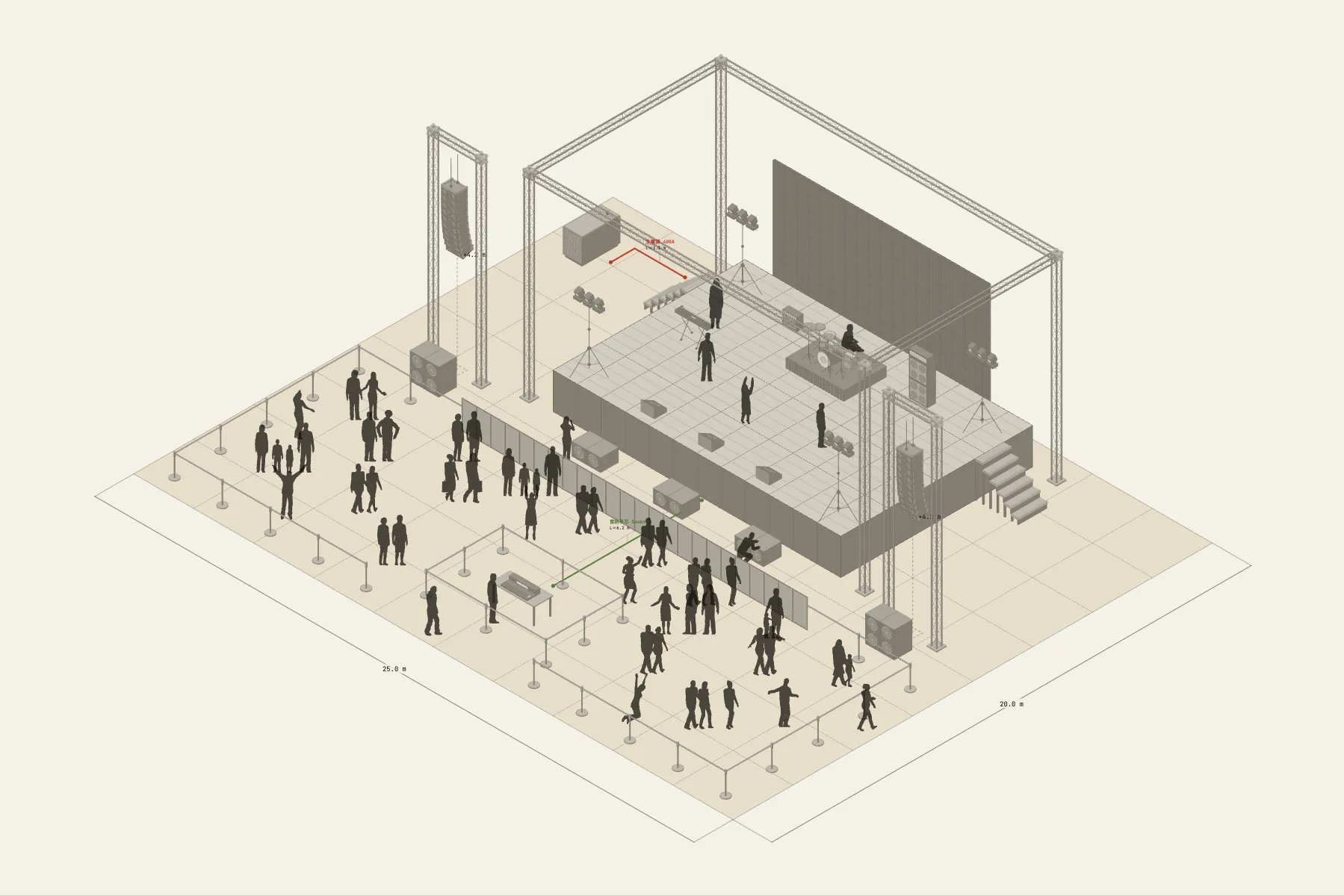
An outdoor concert on a riverside field. The truss stage has an LED screen behind it and the band on it: drums at the back, keys and guitars to the sides, with the PA flown left and right of the stage. The audience stands on the grass in front, inside retractable-belt barriers. The mix position is in the middle of the audience, so the engineer hears what they hear.
When it helps
- The promoter or production manager needs to confirm stage size and truss quantities with the hardware supplier.
- A site application needs a drawing that shows the stage, the barriers and the power position.
- You want to know where the mix position goes and how big the audience area should be.
What’s already laid out
- A truss stage built from 2 m and 4 m sections — only two lengths in the list — with an LED screen at the back.
- A flown line array each side, the bottom box 4.2 m off the ground, and a row of subwoofers along the front.
- Band positions on stage: drums, keys, guitar amps and three monitor wedges along the front edge.
- The front-of-house desk in the audience, 7.8 m from the stage edge.
- Retractable-belt barriers round the audience area and the desk.
- Two cable runs: the audio multicore from the desk to the stage, and mains in from the generator position.
- Plus 33 figures for scale and circulation. If you don’t need them, delete them all in one go.
Making it yours
- Press “Start from this one”. The template opens in the editor as your own drawing; whatever you change, the original template stays as it was.
- Change the stage width by changing the truss length; the section count recalculates.
- Change the site size in the Space panel. One grid square here is 2.5 m, which suits large sites.
- Barriers are drawn in runs — drag an end to change the area, and the post count in the list follows.
- For anything missing, press Components at the bottom: search by name and click to place it. Select what you don’t need and press Delete.
- When the layout is right, press Download at the top right to save it as an image, then drop it into a deck or send it as it is.
What to settle first
- Build the stage structure first. Nothing can be hung until the truss and deck are set.
- Then hang the sound and lighting, checking the hanging points are on the truss.
- Place the band on stage and the desk in the audience, on the stage’s centre line.
- Fence the audience area last and run mains and audio.
What you end up with
- A layout drawing
- Download it as a PNG or JPG, at a resolution that holds up in a deck or a proposal.
- An object list
- The name and quantity of everything on the drawing. Change the drawing and the list changes with it.
- A length for every cable
- Power and signal runs have a length as soon as they are drawn. Order from those numbers.
- A link to send
- Once you sign in, the drawing can become a link that opens in any browser.