The scene
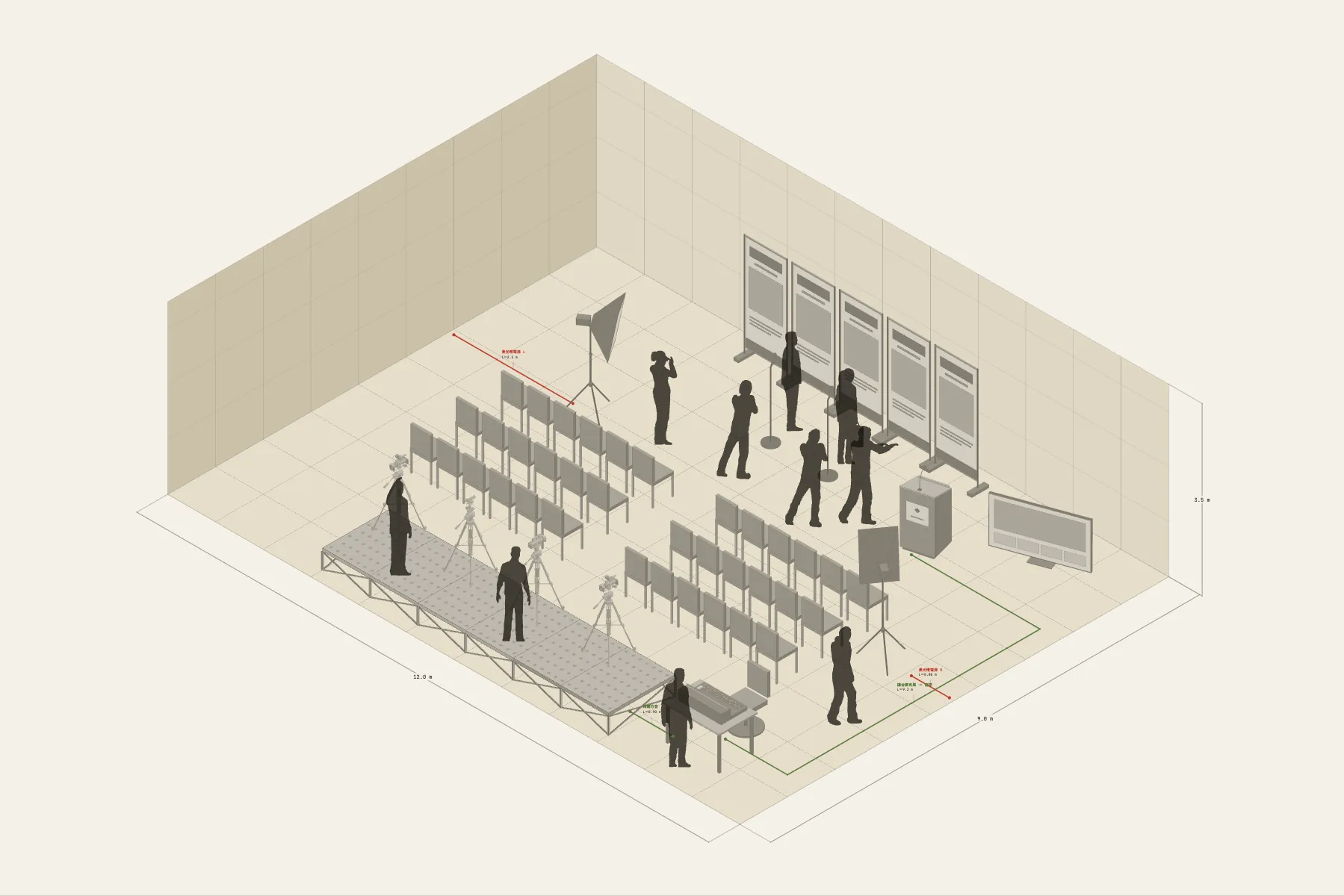
A press conference for a product launch. The speaker stands at a lectern in front of the backdrop, facing 36 press seats. At the back, a raised platform holds four cameras that shoot over everyone’s heads. Two softbox lights hit the speaker from left and right. The sound desk is at the side, and the press take their audio from a feed there.
When it helps
- PR or marketing needs to agree the set-up for the day with the venue and the event company.
- You want to tell the press in advance where the camera positions are and where to pick up audio.
- You need your manager to sign off the picture in front of the backdrop and the number of seats.
What’s already laid out
- A backdrop of five banner frames, 5 m wide, centred on the back wall.
- A lectern in front of it and 36 theatre-style seats facing the backdrop.
- A camera riser, 6 × 1.4 m and 0.4 m high, with room for four cameras.
- One softbox light on each side.
- Four cable runs: lectern microphone to the sound desk, the press audio feed, and power for the two lights.
- Plus 10 figures for scale and circulation. If you don’t need them, delete them all in one go.
Making it yours
- Press “Start from this one”. The template opens in the editor as your own drawing; whatever you change, the original template stays as it was.
- To add or remove seats, change the number of rows and seats per row — the seating is one block.
- The backdrop’s width follows the number of banner frames; one more frame adds a metre.
- For a different room, change its width and depth, then check the riser is still far enough from the lectern.
- For anything missing, press Components at the bottom: search by name and click to place it. Select what you don’t need and press Delete.
- When the layout is right, press Download at the top right to save it as an image, then drop it into a deck or send it as it is.
What to settle first
- Put up the backdrop and lectern first; that fixes the picture.
- Then the cameras. The riser goes at the back and is raised so the lenses clear the people in front.
- Seating goes between the backdrop and the riser, with an aisle down the middle.
- Lights and cables last: lights on the speaker’s face, cables along the wall to the sound desk.
What you end up with
- A layout drawing
- Download it as a PNG or JPG, at a resolution that holds up in a deck or a proposal.
- An object list
- The name and quantity of everything on the drawing. Change the drawing and the list changes with it.
- A length for every cable
- Power and signal runs have a length as soon as they are drawn. Order from those numbers.
- A link to send
- Once you sign in, the drawing can become a link that opens in any browser.