The scene
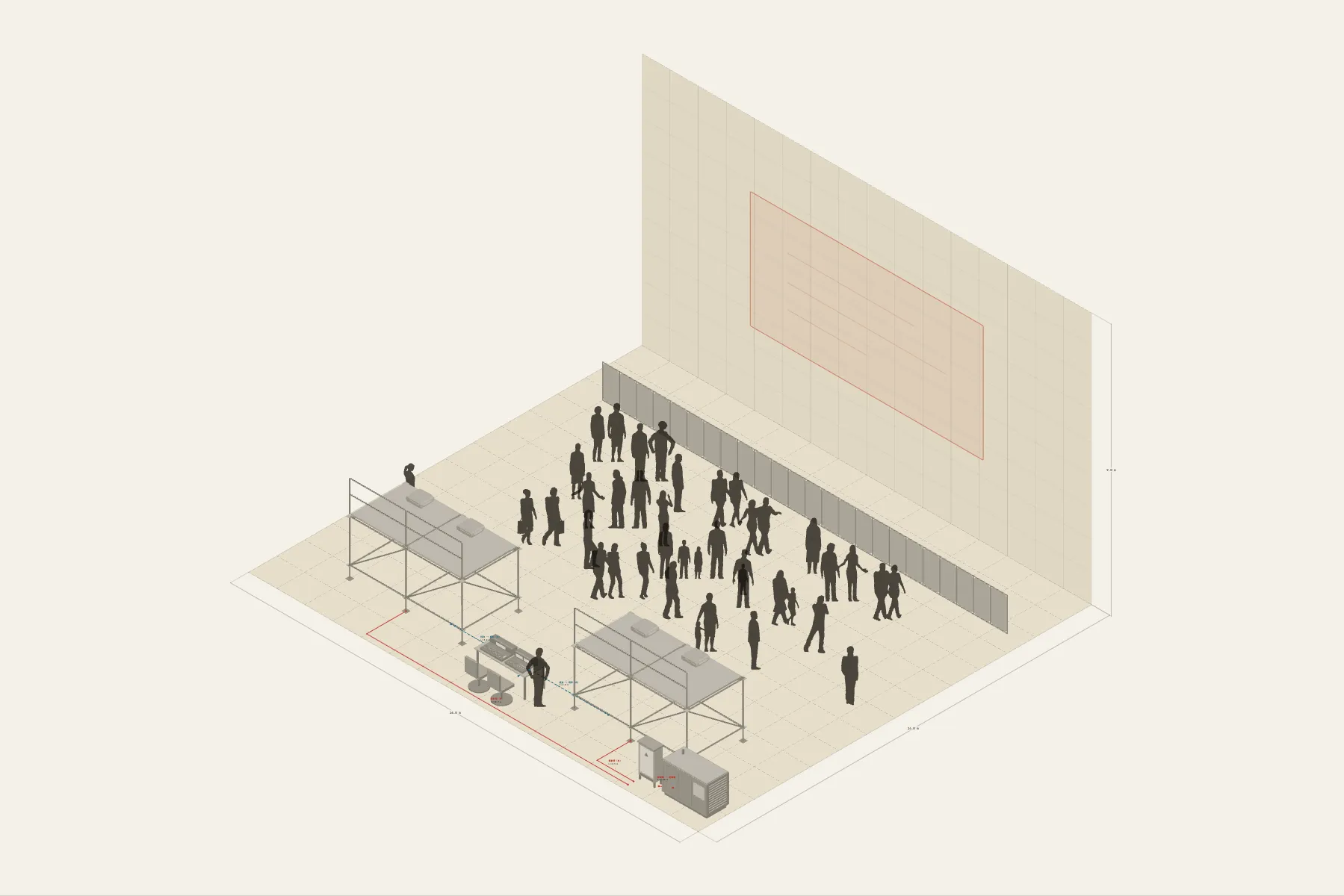
A projection mapping show in the plaza of an old quarter. The facade of an old house, 16 m wide, becomes the screen at night: four projectors on two towers join a 12 × 6 m image from 11 m away. The control desk sits between the towers and the generator in a corner. The audience watches from behind the barriers.
When it helps
- In a proposal, to explain the projected area, the equipment positions and where the audience stands.
- A site or road-use application needs a layout drawing.
- You are estimating projectors, tower sizes and cable lengths.
What’s already laid out
- A 12 × 6 m projected area drawn on the facade, blended from four projectors.
- Two projection towers, each 4 × 2 m with a deck 2 m high and two installation projectors on top.
- 11 m from the facade to the towers, with a dimension line on it.
- The control desk between the towers; the generator and distribution board in a corner.
- Barriers separating the towers from the audience.
- Five cable runs: generator to board, power to each tower, and signal from the desk to the projectors on each side.
- Plus 25 figures for scale and circulation. If you don’t need them, delete them all in one go.
Making it yours
- Press “Start from this one”. The template opens in the editor as your own drawing; whatever you change, the original template stays as it was.
- This drawing uses the Wall archetype: the facade is the subject and the plaza sits in front of it.
- The projected area, tower size and number of projectors can all be changed.
- Measure the throw with a dimension line; the number changes as you drag a tower.
- For anything missing, press Components at the bottom: search by name and click to place it. Select what you don’t need and press Delete.
- When the layout is right, press Download at the top right to save it as an image, then drop it into a deck or send it as it is.
What to settle first
- Draw the projected area on the facade first.
- Then place the towers. The lens decides the distance; whether people will stand in the beam decides the height.
- Put the control desk where it sees the whole wall, and the power in the furthest corner.
- Fence off the audience area last.
What you end up with
- A layout drawing
- Download it as a PNG or JPG, at a resolution that holds up in a deck or a proposal.
- An object list
- The name and quantity of everything on the drawing. Change the drawing and the list changes with it.
- A length for every cable
- Power and signal runs have a length as soon as they are drawn. Order from those numbers.
- A link to send
- Once you sign in, the drawing can become a link that opens in any browser.